
Prompts and Graders: How AI Teams Turn Eval Scores Into Release Decisions
Prompts and graders are becoming the operating vocabulary for AI eval workflows. The prompt defines the behavior you want the AI system to run. The grader evaluates whether the output meets a defined standard. Together, they help teams move beyond "this answer looks better" toward repeatable evaluation evidence.
That evidence is still not the whole release decision.
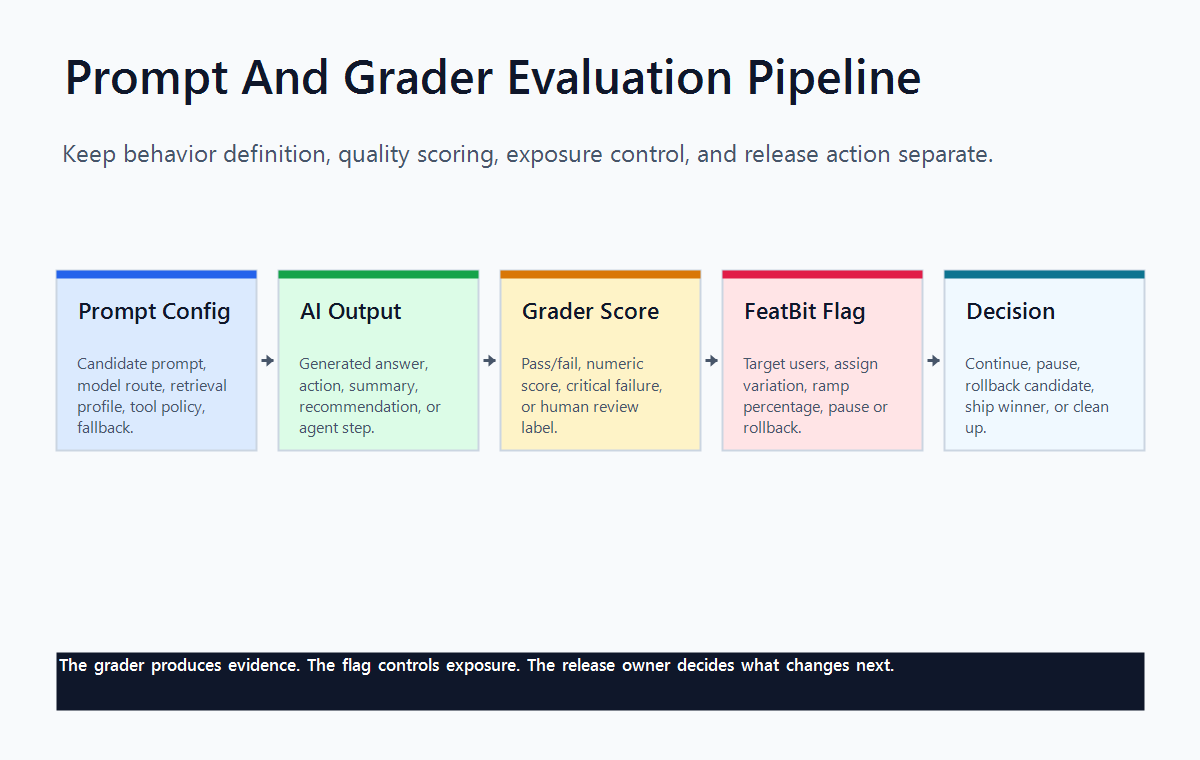
For FeatBit readers, the practical frame is: prompts and graders qualify an AI behavior, while feature flags control who receives it, experiments measure what happens, and release owners decide whether to expand, pause, roll back, or clean up.
What Prompts And Graders Mean
Statsig's Prompts & Graders documentation describes a prompt as a way to represent an LLM prompt or task configuration that can be evaluated, versioned, and rolled out in production without redeploying code. The same page describes a grader as the evaluation component that scores or judges AI output against a desired standard.
In plain terms:
| Term | Practical meaning | Release question |
|---|---|---|
| Prompt | The configured instruction, model choice, provider, parameters, or task setup that produces AI behavior. | Which behavior is the candidate? |
| Grader | The rule, rubric, model judge, similarity check, or review method that scores the output. | Did the candidate meet the quality bar? |
| Critical grader | A must-pass check that blocks a run or candidate when a non-negotiable condition fails. | Is this candidate disqualified before rollout? |
| Feature flag | The runtime control that decides who sees which AI behavior. | Who is exposed, and can we stop quickly? |
| Experiment | The measurement design that compares variants against user, business, and guardrail metrics. | Did the candidate improve the outcome enough to ship? |
This is a useful separation. Prompt management makes AI behavior editable and versioned. Graders make evaluation repeatable. Flags and experiments make production exposure measurable and reversible.
Why The Pair Matters
A prompt without a grader is easy to change but hard to trust. A grader without a prompt contract is hard to interpret because the team may not know which behavior, configuration, or candidate was actually scored.
The pair matters most when an AI behavior affects real users, operators, support workflows, cost, latency, safety, or trust. Examples include:
- changing a support answer prompt from concise to citation-heavy;
- switching a model route for a summarization feature;
- adding retrieval instructions to reduce unsupported claims;
- changing an agent's tool-selection instructions;
- moving from a deterministic classifier to an LLM-based decision step.
Each case needs a clear candidate and a clear evaluation standard. If the grader only says "better answer," the result is too vague for a release decision. If the prompt changes along with model, retrieval, temperature, and tool policy without naming the full bundle, the team may learn that "something changed" but not what to promote or roll back.
A Minimum Prompt And Grader Contract
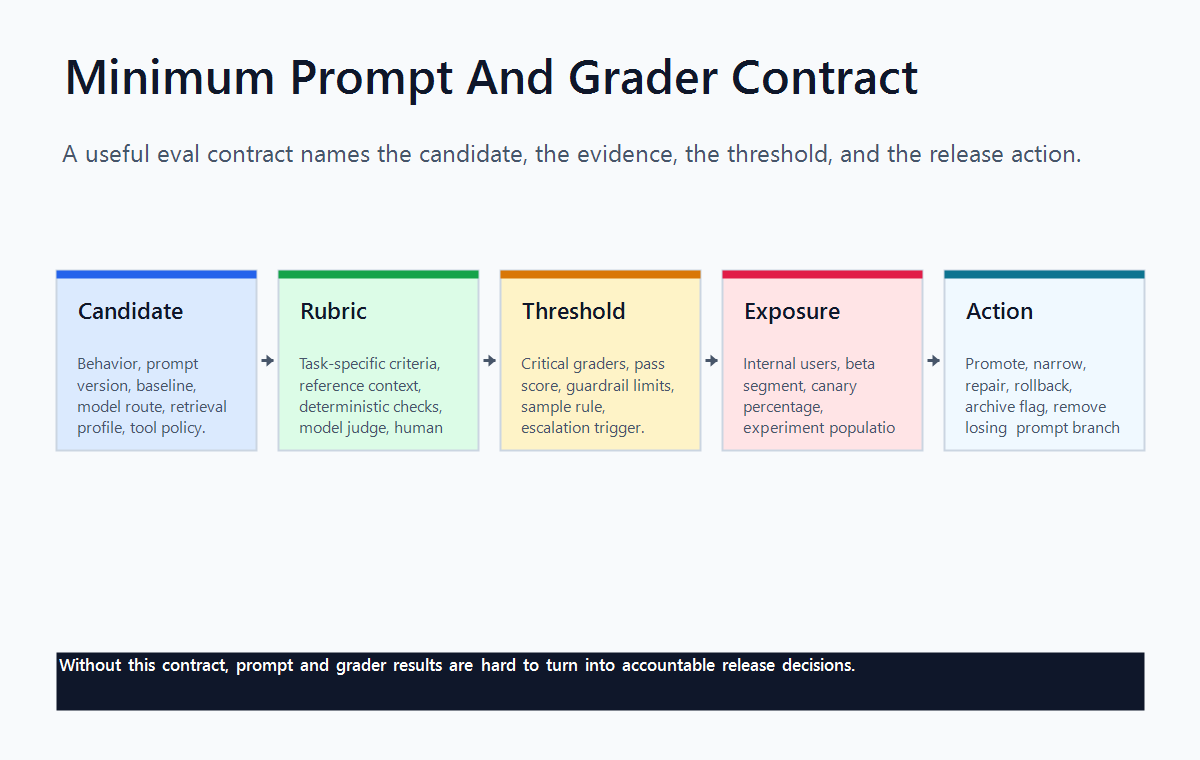
Before relying on prompts and graders for release evidence, write the contract in operational terms.
prompt_grader_contract:
  behavior: support_assistant_refund_answer
  prompt_candidate: refund_answer_prompt_v4
  baseline: refund_answer_prompt_v3
  model_route: standard_support_model
  grader: refund_policy_grounding_v1
  critical_graders:
    - no_fabricated_account_balance
    - cites_current_refund_policy
  score_guardrail: grounding_score_at_or_above_0_85
  primary_outcome: case_resolved_without_escalation
  exposure:
    first: internal_support_team
    next: five_percent_low_risk_accounts
    experiment: account_level_ab_test
  rollback: return_to_refund_answer_prompt_v3
  cleanup: remove_losing_prompt_and_archive_temporary_flag
This contract prevents three common mistakes:
- The prompt changes but the grader still measures the old behavior.
- The grader passes but no one knows what production action should happen next.
- The team promotes a high-scoring candidate without checking real user outcomes or guardrails.
OpenAI's grader documentation is useful category context because it shows several grader types, including string checks, text similarity, score model graders, Python graders, and multigraders. The important release lesson is that grader design is itself a product decision. The team has to define what the score means, what threshold matters, and where human review remains necessary.
How This Differs From A Feature Flag
A prompt can store the AI behavior. A grader can score that behavior. A feature flag controls runtime exposure.
Those jobs should not be collapsed into one concept.
| Capability | What it should own | What it should not own alone |
|---|---|---|
| Prompt | Candidate behavior, prompt text, model config, task setup, version history. | Broad production rollout authority. |
| Grader | Quality evidence, pass/fail checks, score distributions, critical failure signals. | Business impact, segment safety, or final launch decision. |
| Feature flag | Targeting, stable assignment, percentage rollout, rollback, audit trail. | Output grading logic. |
| Experiment | Primary metric, guardrails, exposure-to-outcome analysis, decision state. | Prompt authoring or model-quality scoring by itself. |
This distinction is why FeatBit describes feature flags as release-decision infrastructure. A flag does not judge an answer. It makes the evaluated behavior controllable: internal first, then canary, then experiment, then rollout or rollback.
For a broader category map, see FeatBit's guide to AI evals and release decisions. For a deeper grader-specific discussion, see online graders for AI evaluation and offline graders.
A Practical Workflow For Prompts And Graders
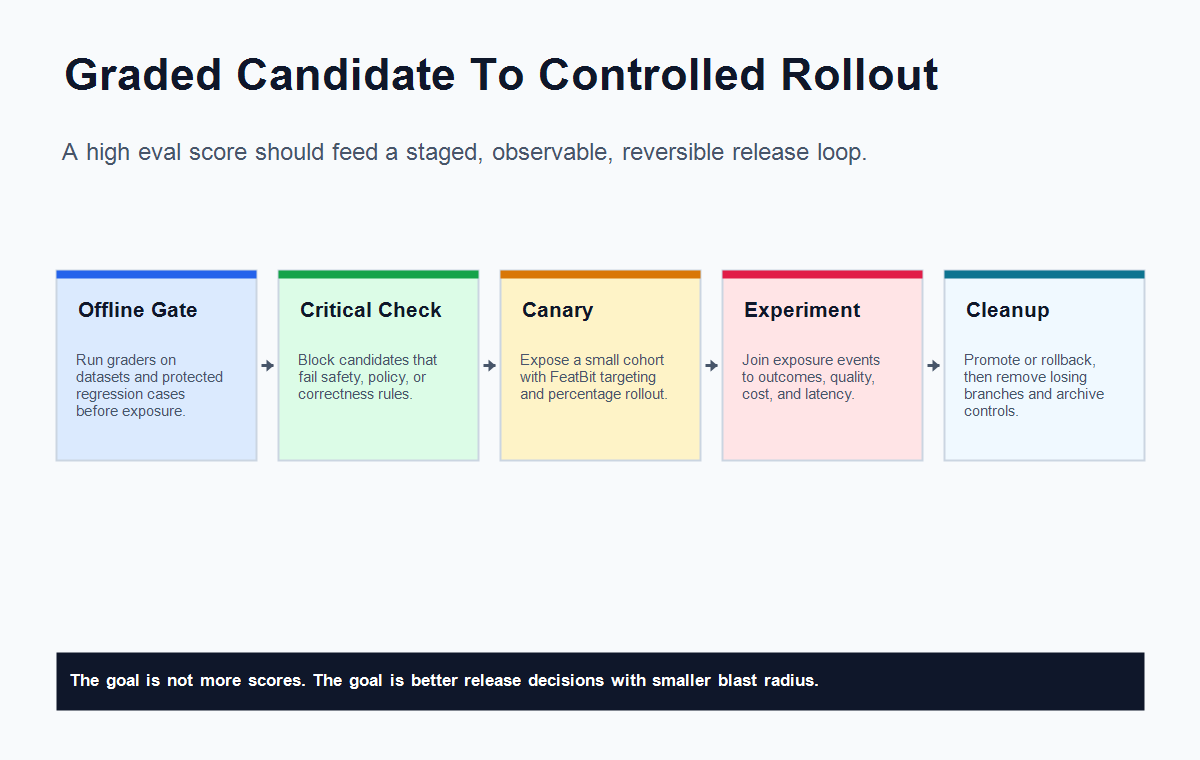
Use prompts and graders as part of a staged release workflow, not as a standalone dashboard.
-
Define the candidate behavior. Name the prompt, model route, retrieval profile, tool policy, and fallback behavior that make up the candidate.
-
Run offline graders. Use deterministic checks, regression cases, model graders, human labels, or reference-answer comparisons before users see the behavior.
-
Treat critical graders as pre-exposure gates. If a non-negotiable check fails, repair the candidate before visible production exposure.
-
Put the qualified behavior behind a runtime flag. Use FeatBit targeting rules to start with internal users, beta accounts, low-risk workflows, or a small traffic percentage.
-
Attach exposure identity to telemetry. Record the flag key, variation, prompt version, grader result, model route, assignment key, and outcome events.
-
Compare real outcomes. Use an experiment when the candidate needs to prove product impact, not only output quality.
-
Decide and clean up. Promote, pause, roll back, or revise. Remove losing prompt branches and archive temporary experiment flags after the decision.
FeatBit's AI experimentation, safe AI deployment, and progressive rollout patterns pages expand the release-control side of this workflow. Implementation primitives include targeting rules, percentage rollouts, A/B testing with feature flags, and the Track Insights API.
When A Grader Score Is Not Enough
A grader score can be high and still fail the release.
That happens when the grader is measuring one layer of quality while the release changes a broader product outcome. A support assistant might produce more grounded answers but increase time to resolution. A coding assistant might pass a style grader but increase review corrections. A RAG answer might cite sources correctly while frustrating users because it is too slow.
Use this rule:
| Evidence | Good for | Still needs |
|---|---|---|
| Offline grader score | Catching preventable regressions before exposure. | Production-shaped inputs, shadow tests, or internal exposure. |
| Online grader score | Monitoring live output quality. | Assignment discipline, sampling design, and rollback control. |
| Critical grader failure | Blocking unsafe or invalid candidates. | Clear ownership and repair path. |
| Experiment metric | Deciding business impact under controlled exposure. | Quality guardrails and segment review. |
| Flag rollout state | Controlling blast radius. | Evidence from graders, outcomes, and observability. |
This is the core FeatBit angle: evaluation evidence becomes useful when it changes a reversible release decision. Otherwise the team may have a sophisticated scorecard and still ship by intuition.
What To Ask When Comparing Prompt And Grader Tools
If you are evaluating a vendor feature, an open-source eval framework, or an internal prompt platform, ask operational questions instead of only feature-list questions.
| Area | Questions to ask |
|---|---|
| Prompt scope | Does the prompt object include model, provider, parameters, retrieval profile, tools, and fallback behavior, or only text? |
| Versioning | Can teams compare prompt versions and know which version served each request? |
| Grader types | Are graders deterministic, similarity-based, model-graded, code-based, human-reviewed, or combined? |
| Critical gates | Can must-pass checks block a candidate before broader exposure? |
| Calibration | Can grader results be compared against human expert labels and repaired over time? |
| Production handoff | Can a passing candidate move into internal exposure, canary, A/B test, or rollback without redeploying? |
| Metrics | Can grader scores be joined with product outcomes, cost, latency, fallback, and support signals? |
| Governance | Who can change prompts, graders, thresholds, rollout percentages, and experiment decisions? |
| Data boundary | Where do prompts, outputs, traces, judge reasons, and evaluation datasets travel? |
| Lifecycle | What happens to losing prompts, temporary graders, and experiment flags after the decision? |
The best setup is not always the one with the most grader types. It is the one that makes the release path explicit: what can change, who sees it, how it is evaluated, when it rolls back, and how temporary controls are removed.
Where FeatBit Fits
FeatBit does not need to be the system that authors prompts or runs graders for the release workflow to work.
It fits the production control layer around those systems:
- route users, accounts, requests, or workflows to a prompt candidate;
- start with internal or beta exposure before customer rollout;
- ramp by percentage when grader scores and guardrails remain healthy;
- record variation identity so grader results and outcome events can be joined;
- roll back to the baseline prompt or model route without redeploying;
- preserve audit history for rollout changes;
- keep experiment flags and AI release controls on a cleanup path.
If your prompt and grader system already produces reliable scores, FeatBit can help turn those scores into controlled exposure and release decisions. If your team is still designing the evaluation layer, start with a smaller contract: one candidate prompt, one clear grader, one critical gate, one primary outcome, one rollback path.
Bottom Line
Prompts and graders are useful AI eval primitives. They help teams version the behavior and score the output.
They should not become hidden launch authority. A passing grader says the candidate met a defined evaluation standard. A release decision still needs controlled exposure, business metrics, guardrails, rollback, ownership, and cleanup.
Use prompts to define the candidate. Use graders to produce quality evidence. Use FeatBit flags to control who sees the candidate. Use experiments and release decisions to decide what should actually ship.
Source Notes
- Statsig terminology context: Statsig Prompts & Graders documentation defines prompts, graders, and critical graders in its AI Evals workflow.
- Statsig product context: Statsig AI Evals describes offline evals, online evals, AI configs, prompt and model versioning, grading pipelines, and experimentation as part of its product positioning.
- Grader taxonomy context: OpenAI graders documentation describes string checks, text similarity, score model graders, Python graders, and multigrader patterns.
- FeatBit implementation context: AI experimentation, safe AI deployment, progressive rollout patterns, targeting rules, percentage rollouts, A/B testing with feature flags, and the Track Insights API support the runtime control and measurement workflow described here.
Image And Open Graph Notes
- Use
cover.pngas the Open Graph image because it summarizes prompts and graders as release evidence that feeds controlled rollout. - Use
evaluation-pipeline.pngnear the opening because it separates prompt config, AI output, grader score, flag exposure, and release decision. - Use
grader-contract-matrix.pngin the contract section because it gives teams a concrete structure for prompt and grader governance. - Use
rollout-feedback-loop.pngin the workflow section because it shows how graded candidates move into FeatBit-controlled exposure, experiments, decisions, and cleanup.